
BRIGHTSPACE FOR STUDENTS
The information below will provide the tools and procedures to get started with in the Brightspace platform.
We are working with CUNY Central to provide students with all information to get started in Brightspace. Please check this page periodically, as it will be updated frequently.
Office Information
Brightspace Learning Management System
Email: brightspace@qc.cuny.edu
Announcements for Students:
November 7, 2024
From the CUNY Learning Management Systems Team
What is the Portfolio Tool and what is it used for?
Brightspace Portfolio is a tool that empowers learners of all ages to independently capture evidence of learning. Learners can maintain their digital portfolio year after year, as they progress through their learning journey.
With Brightspace Portfolio, you can:
- Create learner-centered digital portfolios
- Use age-appropriate modes of the mobile app to collect evidence of learning
- Document process and growth
- Provide formative assessments and real-time feedback
- Record audio and video reflections about a learner’s work
- Use Brightspace Portfolio year-over-year to reflect a learner’s growth and showcase their work
- Ensure learner data is secure and private
- Share evidence of learning with parents and guardians by using Brightspace Parent & Guardian
Ok, now how does one use the tool?
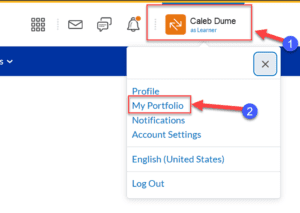
This Tool is available to student and can be access by going to their profile then “My Portfolio”.