
What is DegreeWorks?
DegreeWorks is a web-based program that enables you to easily track your academic progress. You will be able to see how specific College requirements have been met and what courses you can take to fulfill the requirements which are remaining.
With the What-If feature, you will also be able to see how your academic requirements might change if you were to change your major.
How to access DegreeWorks
- Log in to CUNYfirst
- Open Student Center
- Select DegreeWorks from the menu
Video tutorial
Educational Planner Feature
This walkthrough shows how to use the Educational Planner in DegreeWorks
to map out courses and track what you still need for your degree.
Open DegreeWorks from CUNYfirst → Student Center, then follow along with the video.
Full DegreeWorks Video
DegreeWorks requirements, progress, and how to read your audit.
Introduction
A quick start guide to logging in and navigating DegreeWorks in CUNYfirst.
Degree Requirements
Learn how to read your degree requirements and track what you’ve completed and still need.
What is DegreeWorks What-If?
See how your requirements would change if you switched majors or added a minor.
How to: What-If Audit
Step-by-step guide to running a What-If audit and exploring a different major or program.
How to Print What-If Results
Save or print your What-If audit so you can review it with your advisor or keep for your records.
DegreeWorks FAQs
How is a DegreeWorks worksheet different from a transcript?
DegreeWorks shows your progress toward completing your degree. It helps you see which degree requirements you have completed and which ones you still need to complete. DegreeWorks is not your official transcript and does not confirm that you have completed your degree requirements.
Changes to your official academic record may take 24–48 hours to appear in DegreeWorks. DegreeWorks also does not replace the College Catalog or the College’s academic policies.
Your transcript is your official College record. It includes your courses, grades, credits, and other academic information.
To order an official transcript, visit the Transcript Request page for instructions.
If this is not an official review of my degree requirements, where can I go to find out what other requirements I might need?
To find out what other requirements you might need, please make an appointment with an Academic Advisor who will review your requirements.
According to my audit, “Credits Applied” indicates I have more credits than I’ve actually completed. Why?
DegreeWorks counts completed and in-progress courses — currently in-progress and future courses you have registered for — in the Credits Applied category.
Why are my newly registered courses or classes currently in-progress (IP) not appearing on my DegreeWorks worksheet?
Newly registered courses and information from CUNYfirst usually takes at least 24–48 hours to be reflected and uploaded to DegreeWorks. If you would like to preview how your new classes would apply to your DegreeWorks worksheet, you can use the Look Ahead tab.
What does the “Not Counted” section at the end of my DegreeWorks mean?
Not Counted are courses that will not be applied to your record and will be subtracted from your total credit count. These courses may be duplicate courses (if there are duplicates, the program will automatically select the one taken first) or courses that exceed the maximum allowable transfer credit limit.
What does “Elective Classes Allowed” mean?
Students are allowed a different number of general electives depending on the amount of coursework completed, as well as the number of credits required by a student’s major, certificate or minor, to meet the total number of credits required for the degree program.
A student with an undeclared major will have a higher number of elective courses than a student who has declared a major or minor, and the elective classes allowed may change as majors are declared.
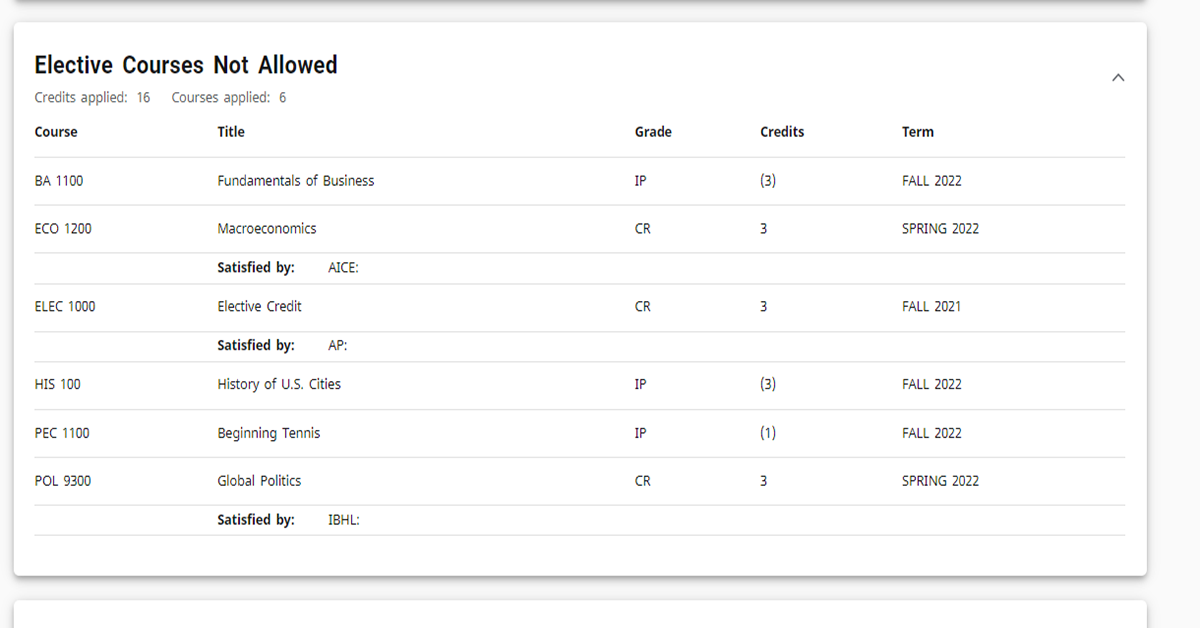
Does the "Elective Courses Not Allowed" section mean that these credits are not being counted towards my degree?
Elective Courses Not Allowed may count towards the degree and total credit count. However, any course that exceeds the number of credits for Elective Courses Allowed or does not apply to any requirement will fall into this section. Elective Courses Not Allowed are still counted towards the degree and total credit count.
This section is very important in DegreeWorks because it impacts financial aid and therefore the TAP award. The courses in this category are not required toward the degree, according to the curriculum of record, and will therefore trigger a course ineligibility flag in the Financial Aid Certification & Tracking System (FACTS) for financial aid.
NOTE: Each semester please ensure that the course(s) "In-progress" do not fall into this section. If any course(s) a student is currently enrolled in falls into the "Elective Courses Not Allowed" section of the audit, the student must contact a DegreeWorks liaison at their campus in order to reconcile.
Will I be graduated if everything is checked off?
You will need to apply for graduation through your CUNYfirst Student Center. After you have successfully applied, you will undergo a review conducted by the Office of the Registrar and will be alerted if you have any issues.
It is best to meet with an Academic Advisor and departmental/faculty major advisor in the semester prior to applying for graduation.
Where can I find more information about DegreeWorks and staying on track for graduation?
You can find more information on CUNY’s DegreeWorks — Stay on Track for Graduation site.
Contact us
In-person
Dining Hall, Room 128
Monday – Friday
9am to 5pm
Virtual Appointment
Monday – Thursday 8:30am to 4:30pm
Friday 2:30pm to 4:30pm
Book appointment →